 Contact
  Infocenter
  login
login Requires the base game Hunt: Showdown 1896 on Steam in order to use Hunt: Showdown 1896 - The Trick Shooter.
 0 Product Products 0 Vare
 No products
Your basket contains
0 Product(s) for a total of: 0 NOK
0 Product(s) for a total of: 0 NOK

Product successfully added to your shopping cart
Quantity
Total
There are 0 items in your cart. There is 1 item in your cart.
Total products
Total shipping To be determined
Total
Hunt: Showdown 1896 - The Trick Shooter (PC)
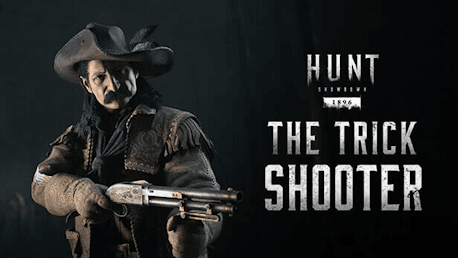
Hunt: Showdown 1896 - The Trick Shooter (PC)

Hunt: Showdown 1896 - The Trick Shooter CD key to be activated and downloaded via Steam. You will not be sent any physical items in the mail. You will receive a(n) Steam product key via e -mail.

Additional content!
HUNT: SHOWDOWN 1896 - THE TRICK SHOOTER GAME DESCRIPTION
This DLC contains one Hunter and two Weapons:
- Carter (Hunter)
- Bear's Leg (Vandal 73C Bullseye)
- Carter's Quickshot (Specter 1882 Shorty)
Carter
William Carter was a sharpshooter, and the inventor of many a curious new attraction for the Wild West Shows he starred in. Ever the showman, he fictionalized most of his life story, and though no one knows his true origins two things are clear: he’s a fearsome shot with an extravagant sense of humor – and adventure.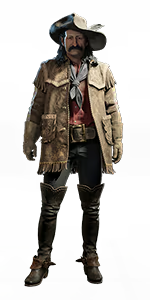
Bear’s Leg
This Vandal 73C Bullseye played center stage in Carter’s show. He dazzled the crowd, cocking it with extravagant spins, the stage lights glinting on the pearlescent lens and gold-inlay bear.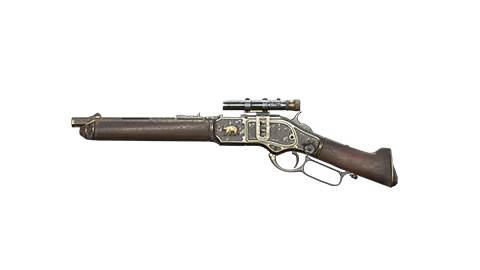
Carter's Quickshot
Gifted to the sharpshooter William Carter, this personalized Specter 1882 Shorty is ideal for pulling off fast shooting sequences to dazzle spectators and intimidate foes.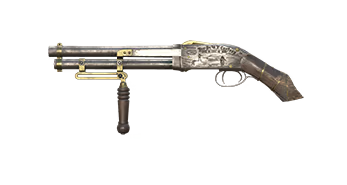


FREQUENTLY ASKED QUESTIONS
How does it work? Will I receive Hunt: Showdown 1896 - The Trick Shooter as a physical copy?
No, you will receive Hunt: Showdown 1896 - The Trick Shooter product key (Hunt: Showdown 1896 - The Trick Shooter CD Key), that you will receive by e-mail. Afterwards, you will need to use the Steam-platform to redeem your Hunt: Showdown 1896 - The Trick Shooter product key (Hunt: Showdown 1896 - The Trick Shooter CD Key), and you'll be ready to download, install and play Hunt: Showdown 1896 - The Trick Shooter. You will receive a step-by-step guide on how to do this along with your purchase. It's easy as can be!
This DLC contains one Hunter and two Weapons: - Carter (Hunter) - Bear's Leg (Vandal 73C Bullseye) - Carter's Quickshot (Specter 1882 Shorty)
Genre Action Multi-player Online PvP Co-op Online Co-op Downloadable Content Steam Achievements Full controller support Steam Trading Cards In-App Purchases Steam Leaderboards Remote Play on TV
Publisher CryTek
PEGI-rating 
Udvikler Crytek
Platform PC
Sprog Engelsk Fransk Italiensk Tysk Spanish - Spain Portuguese - Portugal Russisk Simplified Chinese Polsk Turkish Japansk Portuguese - Brazil
Multiplayer Ja
Release date 21-01-2021
System requirements Read moreNo customer reviews for the moment.